Area 00 // FoundationsLesson 10 / 14015 min read
Calling an LLM API for the first time
Calling an LLM is just sending an HTTPS request with your API key, a model name and your messages to a provider like OpenAI or Anthropic, and reading the text that comes back, or doing the same for free against a model on your own laptop with Ollama.
Think of it like this
Analogy
Ordering from a restaurant by phone: you call the number (the API endpoint), give your account number so they know who's paying (the API key), say which dish you want (the model), and give your order in words (the prompt). A few moments later the food arrives (the response), with a bill itemised by size (the token usage).
You don't need to know how the kitchen works to order. Calling an LLM is the same.
The problem it solves
Large language models are far too big to run on most laptops: the best ones need racks of GPUs. So providers run them in their data centres and let you use them over the internet through an API.
To build anything with AI you first need to send a request, get an answer back, handle errors, and not leak your key or burn money by accident. Once you can do that, everything else in this course builds on it.
How it works, step by step
- Get an API key from the provider's console (platform.openai.com, console.anthropic.com, Google AI Studio). It's a secret, like a password, tied to your billing.
- Store it in an environment variable, never in code:
OPENAI_API_KEYorANTHROPIC_API_KEY. On Windows PowerShell:$env:OPENAI_API_KEY="..."; on macOS/Linux:export OPENAI_API_KEY=.... - Install the provider's SDK (
pip install openaiorpip install anthropic). It's a thin wrapper around HTTPS requests that handles auth, retries and parsing. - Build the request: a model ID, your prompt (as messages with roles:
systemfor instructions,userfor the question,assistantfor earlier replies), and limits likemax_tokens. - Send it. The provider runs inference on its GPUs and returns the generated text plus how many tokens it read and wrote.
- Read the reply and the usage. Check why it stopped (finished, hit max tokens, refused, wants to call a tool).
- Handle errors. 401 = bad key, 429 = rate limited (retry later), 5xx = provider trouble (retry). The SDKs retry some of these for you.
See it in code
- Install
pip install openai anthropic ollama- Needs
- An OpenAI or Anthropic API key in an environment variable, or Ollama installed for the free local version.
The same question three ways. Model IDs and prices are as of November 2026; check the provider's models page for current names.
from openai import OpenAI

client = OpenAI()   # reads OPENAI_API_KEY from the environment

response = client.responses.create(
    model="gpt-6.1-sol",                                  # which model to use
    instructions="You are a patient teacher. Answer in two sentences.",  # system prompt
    input="What is a token in an LLM?",                    # the user's question
)
print(response.output_text)                               # the generated answer
print(response.usage.input_tokens, "in /", response.usage.output_tokens, "out")import anthropic
client = anthropic.Anthropic() # reads ANTHROPIC_API_KEY from the environment
message = client.messages.create(
model="claude-sonnet-5-5",
max_tokens=1024, # cap on reply length (required)
system="You are a patient teacher. Answer in two sentences.",
messages=[{"role": "user", "content": "What is a token in an LLM?"}],
)
print(message.content[0].text) # first content block is the text
print(message.usage.input_tokens, "in /", message.usage.output_tokens, "out")
print("stopped because:", message.stop_reason) # e.g. end_turn, max_tokens# Free and offline: install Ollama, then run `ollama pull llama3.2` once.
import ollama
reply = ollama.chat(
model="llama3.2", # a small open model (3B)
messages=[
{"role": "system", "content": "You are a patient teacher. Answer in two sentences."},
{"role": "user", "content": "What is a token in an LLM?"},
],
)
print(reply.message.content)A token is a small chunk of text, often a word or part of a word, that the model reads and writes one at a time.
Prices and limits are counted in tokens, so "unbelievable" might cost three tokens while "cat" costs one.
21 in / 46 out
stopped because: end_turnOn the real platform
What this looks like in the OpenAI and Anthropic consoles · See the real screen in the official docs
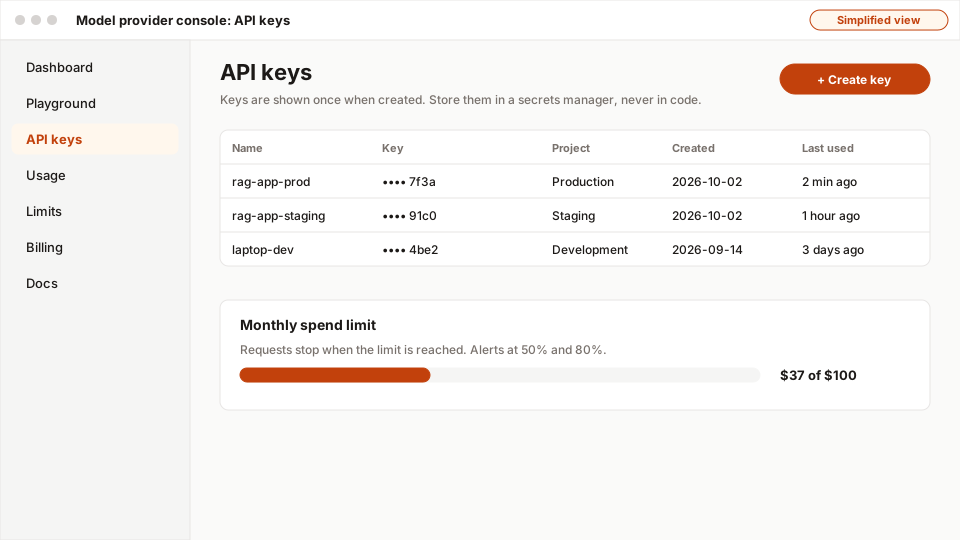
- 1API keys lives in the sidebar, next to Usage, Limits and Billing.
- 2Create a key per app and environment; it's shown only once.
- 3Keys are masked after creation; the name tells you where each is used.
- 4Set a monthly spend limit and alerts before you ship anything.
Both consoles look different and change often, so here's the path in words rather than a screenshot. Vendor console screenshots are not licensed for reuse.
- Sign in at platform.openai.com or platform.claude.com (Anthropic's console).
- Billing: add a payment method or prepaid credits, and set a monthly spend limit before anything else.
- API keys: create a key, name it after the project ("ai-course-laptop"), copy it once into your environment variable. You can't view it again later.
- Usage: the usage or cost page shows tokens and spend per day and per model. Check it after your first runs.
- Playground / Workbench: both consoles let you try prompts in the browser before writing code.
A real example
Example
A shop adds 'summarise this review' in an afternoon
An online shop wants a one-line summary above long product reviews. A developer writes a 15-line function like anthropic_hello.py: system prompt "Summarise this review in one neutral sentence", the review as the user message, max_tokens=100. They run it on 50 reviews in a notebook, check the summaries by hand, and log tokens per call: about 300 in and 30 out, roughly $0.0009 per review at November 2026 Sonnet-class prices. Cheap enough to ship.
Everything later in this course (caching, evals, rate limits, guardrails) is about making exactly this kind of call reliable, safe and affordable at scale.
The easy way
Start here
No card, no key? Install Ollama, run ollama pull llama3.2, then run ollama_hello.py. Once that works, the hosted APIs are the same pattern with a key. When you do use a hosted API, set a low monthly spend limit first.
When you grow: the production setup
Production code wraps the call in one function of your own (so you can swap providers), sets timeouts, retries 429/5xx with backoff, streams long replies to the user, logs token usage and latency per request, validates the output, and keeps keys in a secrets manager. Areas 5–8 cover each of these.
Trade-offs
What you gain
- Access to the most capable models with a few lines of code and no GPUs.
- Pay only for what you use; nothing to maintain.
- Providers improve models constantly; switching is often a one-word model ID change.
What it costs you
Common mistakes
- Pasting the API key into the script and pushing it to GitHub. Bots find leaked keys within minutes.
- Not setting a spend limit, then an infinite loop burns through credits overnight.
- Forgetting
max_tokens(Anthropic) or setting it so low the answer gets cut off mid-sentence. - Ignoring
stop_reason/ errors and treating every response as a complete answer. - Copying model names from an old tutorial; check the provider's current models page.
Interview questions
Try answering out loud first, then open the model answer.
Walk me through what happens when your app calls an LLM API.
Model answer
The app builds a request with the model ID, messages (system, user, prior turns), and parameters like max tokens; the SDK sends it over HTTPS with the API key. The provider authenticates, applies rate limits, tokenises the input, runs inference on GPUs generating tokens until a stop condition, and returns the text, the stop reason and token usage. The app checks the stop reason, handles errors or retries, logs usage for cost tracking, and uses or validates the output.
How do you keep API keys safe in a project?
Model answer
Never hard-code them: read from environment variables locally (a git-ignored .env is fine), use a secrets manager in production, give each environment and service its own key with minimal permissions, set spend limits, rotate keys regularly and immediately if leaked, and scan repos for secrets in CI.
What errors should a production LLM client handle?
Model answer
Authentication errors (401/403: don't retry, alert), bad requests (400: fix the request, e.g. too many tokens), rate limits (429: retry with exponential backoff and jitter, respect retry-after), server errors and overloads (5xx: retry, then fall back to another model or provider), timeouts and network errors (retry with a timeout budget), and incomplete outputs (max_tokens or refusal stop reasons).
Quiz
Pick an answer to see whether it’s right and why.
0 of 6 answered
Key terms
- API
- Application programming interface. A defined way for one program to ask another for something, usually by sending an HTTP request and getting a response.
- API key
- A secret string that identifies you (and who pays) when calling an API. Treat it like a password.
- Prompt
- The input you give a language model, including instructions, context and the question.
- Token
- A small chunk of text (a word, part of a word or a symbol) that a language model reads and writes one at a time. Usage and prices are counted in tokens.
- Large language model (LLM)
- A very large neural network trained on huge amounts of text to predict the next token. That one skill lets it answer questions, write, summarise and follow instructions.
- Environment variable
- A named value set outside your code (in the shell, a .env file or a server's settings), used for secrets and config.
- Ollama
- A free tool that downloads open-weights models and runs them on your own computer, with a simple API.
Before and after
Progress is saved in this browser only.