Area 03 // AI AgentsLesson 58 / 14015 min read
The OpenAI Agents SDK and other frameworks
The OpenAI Agents SDK is a small Python library with a few building blocks (agents with instructions and tools, a runner that executes the loop, handoffs, guardrails, sessions and tracing), and it sits among other frameworks like the Claude Agent SDK, LangGraph, CrewAI, AutoGen and LlamaIndex, each with a different focus.
Think of it like this
Analogy
You can build a bookshelf from raw planks with a saw, or buy a flat-pack kit with pre-cut pieces, a manual and the right screws. Flat-pack is faster and harder to get wrong, but you build what the kit designer had in mind. Agent frameworks are the flat-pack kits of agents; different brands specialise in different furniture.
The problem it solves
Every agent needs the same plumbing: the loop, tool schemas from functions, conversation memory, hand-offs between agents, input and output checks, limits, and tracing. Writing it all yourself is educational but slow, and easy to get subtly wrong. Frameworks provide it, but there are many, they change fast, and they lock you into their concepts.
You need to know what one well-known framework looks like, and how to choose between them.
How it works: the OpenAI Agents SDK
- Install:
pip install openai-agents(version 0.24 as of November 2026). It uses OpenAI's Responses API by default and can work with other providers through adapters. - Define tools as Python functions with
@function_tool: the type hints become the JSON Schema and the docstring the description (tool calling). - Create an
Agent:name,instructions,tools, optionalhandoffs,input_guardrails/output_guardrails,output_type(a Pydantic model for structured output),model. - Run it with
Runner.run_sync(agent, "question")(orawait Runner.run(...)). The runner executes the agent loop: model call → tool calls → results → repeat, up tomax_turns(default 10). - Handoffs: list other agents in
handoffs=[...]; the SDK gives the model a transfer tool for each (handoffs). - Guardrails: functions that check input or output (often with a small, fast model) and raise a tripwire to stop the run.
- Sessions store conversation history between runs (e.g.
SQLiteSession), giving short-term memory. - Tracing is built in: every run, model call, tool call and handoff is recorded and viewable in the OpenAI dashboard (or exported).
How it works: other frameworks at a glance
As of November 2026, the main options and what they're best at:
| Framework | Focus | Good fit |
|---|---|---|
| OpenAI Agents SDK | Small set of primitives: agents, tools, handoffs, guardrails, sessions, tracing | Quick, clean agents, especially on OpenAI models |
| Claude Agent SDK | Claude Code's harness as a library: built-in file, shell, search tools, subagents, hooks, permissions | Coding and file-system agents, long autonomous tasks |
| LangGraph | Graphs with state and durable checkpoints | Complex, long-running, branching, human-in-the-loop flows |
| CrewAI | "Crews" of role-based agents with tasks | Multi-agent prototypes framed as teams |
| AutoGen / Microsoft Agent Framework | Conversational multi-agent patterns | Agents talking to each other, research and enterprise .NET/Python stacks |
| LlamaIndex | Data connectors, indexing and agentic RAG | Agents centred on documents and knowledge |
| Provider tool runners | Thin loop helpers in the model SDKs (e.g. Anthropic's tool runner) | Simple tool agents without a framework |
Choose by: how complex the control flow is, whether you need durability, which models you use, how much you want built-in tooling, and your appetite for dependencies. And remember the plain loop (capstone) is always an option.
See it in code
- Install
pip install openai-agents- Needs
- OPENAI_API_KEY in an environment variable. Model names as of November 2026.
Two agents with a tool, a handoff and a step cap.
from agents import Agent, Runner, function_tool

@function_tool
def get_order_status(order_id: str) -> str:
    """Look up the delivery status of an order, e.g. A1234."""
    return {"A1234": "out for delivery"}.get(order_id, "order not found")

billing = Agent(
    name="Billing",
    handoff_description="Handles refunds, invoices and payment problems.",
    instructions="You handle billing questions. Be brief and precise.",
)

support = Agent(
    name="Support",
    instructions="Help customers with orders. Hand off billing questions to Billing.",
    tools=[get_order_status],          # a function tool
    handoffs=[billing],                # the model can transfer the conversation to Billing
    model="gpt-6.1-sol",
)

result = Runner.run_sync(support, "Where is my order A1234?", max_turns=6)
print(result.final_output)
print("answered by:", result.last_agent.name)Your order A1234 is out for delivery and should arrive today.
answered by: SupportAsk "I was charged twice" instead and last_agent becomes Billing. Each run appears as a trace (model calls, the tool call, any handoff) in the OpenAI dashboard's traces page.
On the real platform
What this looks like in the OpenAI traces dashboard · See the real screen in the official docs
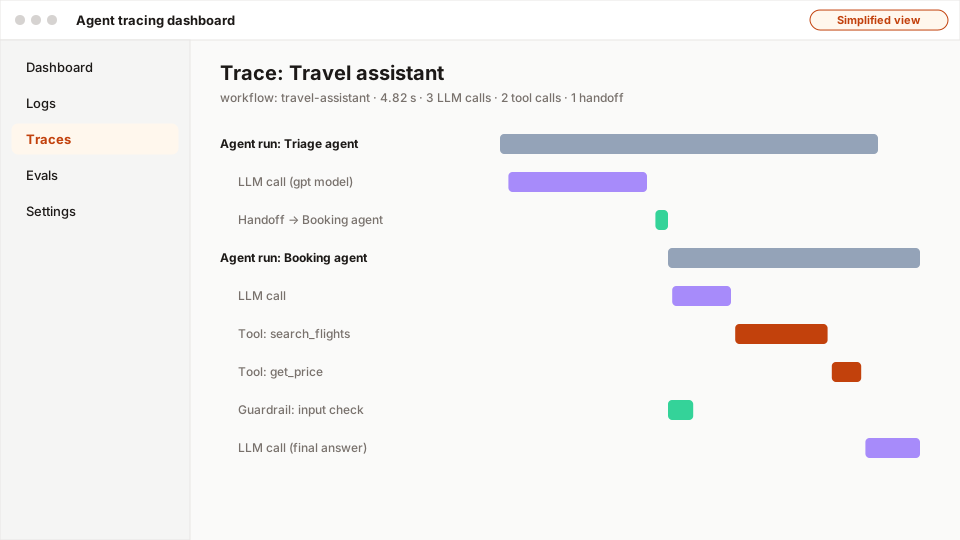
- 1The whole workflow: total time and counts of calls.
- 2A handoff from the triage agent to the booking agent.
- 3Tool calls as spans, with their own timing.
- 4Guardrails run as spans too, in parallel with the agent.
Vendor dashboards change often and their screenshots aren't licensed for reuse, so here's what to look for:
- Traces list: one row per
Runner.run, with workflow name, duration and status. - Open a trace: a timeline of spans: each agent turn, each model call (with tokens), each tool call (with arguments and result), each handoff and guardrail.
- Click a model span: see the exact input and output, which is how you debug wrong tool choices.
- Group traces with
trace("name")in code so multi-step workflows show as one trace. - Turn off or redirect tracing for sensitive data, or export spans to your own observability tool.
A real example
Example
Choosing a framework for three projects
One AI team, three projects, three choices:
- Customer support assistant (OpenAI models, three specialist agents, guardrails): the OpenAI Agents SDK, because handoffs, guardrails and tracing covered everything with very little code.
- Mortgage-processing agent (days-long, human approvals, must survive deployments): LangGraph with a Postgres checkpointer.
- Internal code-migration bot (reads and edits many files, runs tests): the Claude Agent SDK, whose built-in file and shell tools, permissions and hooks saved weeks.
Each is wrapped in the team's own thin interface, so swapping later is possible.
The easy way
Start here
Build the plain loop once to understand it. Then pick one framework that matches your main need (simple agents: OpenAI Agents SDK or a provider tool runner; durable complex flows: LangGraph; coding agents: Claude Agent SDK) and build the same agent again.
When you grow: the production setup
Teams standardise on one or two frameworks, wrap them behind internal interfaces, pin versions, export traces to their observability stack (OpenTelemetry), add their own guardrails and evals around framework defaults, and keep agents portable across model providers where possible.
Trade-offs
What you gain
- Much less plumbing: loops, schemas, handoffs, memory, tracing come built in.
- Proven patterns and community examples.
- Built-in tracing makes debugging much easier.
What it costs you
- Dependency and API churn; fast-moving projects change often.
- Abstractions can hide what's sent to the model.
- Some frameworks favour particular providers.
When not to use it
- A small agent with one or two tools where the plain loop is shorter and clearer.
- You need behaviour the framework's abstractions fight against.
Common mistakes
- Picking a framework before understanding the agent loop it wraps.
- Copying tutorials written for an older major version.
- Leaving tracing on for sensitive data without checking where traces go.
- No
max_turns/ limits because "the framework handles it". - Spreading framework types through the whole codebase, making it hard to switch.
Interview questions
Try answering out loud first, then open the model answer.
What are the core primitives of the OpenAI Agents SDK?
Model answer
Agents (an LLM with instructions, tools, handoffs, guardrails and optional structured output type), the Runner that executes the agent loop with a max-turns limit, function tools created from Python functions, handoffs for transferring control between agents, input/output guardrails with tripwires, sessions for conversation memory, and built-in tracing of runs, model calls, tool calls and handoffs.
How do you choose an agent framework?
Model answer
Match the framework to the requirements: control-flow complexity and durability (LangGraph for graphs and checkpoints), simplicity and provider fit (OpenAI Agents SDK, provider tool runners), built-in coding and file tools (Claude Agent SDK), document-centric agents (LlamaIndex), multi-agent conversation patterns (AutoGen-style). Consider maturity, tracing and eval integration, provider portability and dependency risk, and keep it behind an internal interface.
When is a plain hand-written agent loop the better choice?
Model answer
When the agent is small, the tool set is limited, you need full transparency over every request, you want to avoid dependency churn, or the framework's abstractions don't fit your control flow. A plain loop is about thirty lines and easy to test; add pieces (checkpoints, tracing) as needed.
Quiz
Pick an answer to see whether it’s right and why.
0 of 5 answered
Key terms
- OpenAI Agents SDK
- OpenAI's Python library for agents, with agents, tools, handoffs, guardrails, sessions and built-in tracing.
- Agent framework
- A library that provides the agent loop and common pieces (tools, memory, handoffs, tracing) so you don't write them yourself.
- Handoff
- One agent transferring control of a conversation to another, more specialised agent.
- Guardrail
- A check on an AI system's input or output (rules, classifiers or a model call) that can block, modify or flag content.
- Tracing
- Recording every step of a request (model calls, tool calls, retrieval) with timing, inputs and outputs, so you can debug and measure it.
Before and after
Progress is saved in this browser only.