Area 01 // LLMsLesson 25 / 14015 min read
Prompt caching and token pricing
LLM APIs charge per million tokens, with output costing several times more than input, and prompt caching lets the provider reuse the work for a repeated beginning of your prompt, cutting the price and latency of those tokens dramatically.
Think of it like this
Analogy
A taxi charges for distance, and charges more per mile in the city centre. LLM APIs are similar: you pay per token, and output tokens are the expensive city miles.
Prompt caching is like a commuter season ticket for a route you travel every day. If every journey starts with the same long stretch (your system prompt, tool list and policy documents), you pay a small fee for that stretch instead of the full fare every time.
The problem it solves
LLM costs are invisible until the invoice arrives. A prototype that costs pennies can cost thousands a month at real traffic, especially when every request resends a long system prompt, tool definitions and documents. Teams often discover too late that most of their bill is the same few thousand tokens sent over and over.
You need to estimate costs before launch, know which parts dominate, and use caching and batching to cut them.
How it works: token pricing
- Providers price per million tokens, separately for input tokens (everything you send) and output tokens (everything generated, including hidden reasoning tokens).
- Output costs more, typically 4–5× input, because generation is sequential.
- Cost per request = input tokens ÷ 1M × input price + output tokens ÷ 1M × output price.
- Prices vary 20–100× across model tiers. As of November 2026 for example: Claude Sonnet 5.5 and GPT-6.1 Sol are $2 / $10 per 1M; Claude Haiku 5.5 and GPT-6 Luna are $0.10 / $0.50; top models cost more (Claude Opus 5.5 $4 / $20, GPT-6 Astra $10 / $50). Check the providers’ pricing pages before you budget.
- Other price modifiers: long-context surcharges on some models, cached-input discounts, batch API discounts (~50%), and premium "fast" modes.
- Read your real usage from each response (
usage.input_tokens,usage.output_tokens, cached token counts) and log it per feature.
How it works: prompt caching
- Many requests start the same way: system prompt, tool definitions, a long document, the earlier part of a conversation.
- The provider stores the processed prefix (its KV cache) for a short time after a request.
- A later request with an identical prefix is a cache hit: those tokens are billed at a discount (roughly 10% of the input price at OpenAI and Anthropic as of November 2026) and the response starts faster.
- It's an exact prefix match. One changed character early on (a timestamp, a user name, reordered tools) breaks everything after it. Put stable content first and changing content last.
- Provider differences (as of November 2026): OpenAI caches long prefixes automatically. Anthropic uses
cache_controlmarkers (or a top-level automatic setting); writing to the cache costs a little more than normal input (about 1.25×) and the default lifetime is about 5 minutes, with a longer option. - Check it works: look at cached-token counts in the usage data (
cache_read_input_tokensfor Anthropic,cached_tokensdetails for OpenAI). Zero hits usually means something in your prefix changes.
See it in code
- Needs
- Nothing: plain Python 3. Prices are examples as of November 2026; use your provider's current page.
Monthly cost for a support bot whose 6,000-token prefix (system prompt, tools, policies) is the same on every request.
# Cost of a support bot per month, with and without prompt caching.
# Prices: $ per 1M tokens, example mid-tier model (as of Nov 2026: $2 in, $10 out;
# cached reads ~10% of the input price, cache writes ~125%). Check your provider.
PRICE_IN, PRICE_OUT = 2.00, 10.00
CACHE_READ, CACHE_WRITE = PRICE_IN * 0.10, PRICE_IN * 1.25

requests_per_month = 300_000
shared_prefix = 6_000      # system prompt + tool definitions + policy docs, same every time
unique_input = 400         # the user's message and recent history
output = 250
cache_hit_rate = 0.95      # share of requests that find the prefix already cached

def per_million(tokens, price):
    return tokens / 1e6 * price

no_cache = requests_per_month * (
    per_million(shared_prefix + unique_input, PRICE_IN) + per_million(output, PRICE_OUT))

hits = requests_per_month * cache_hit_rate
misses = requests_per_month - hits
with_cache = (hits * per_million(shared_prefix, CACHE_READ)
              + misses * per_million(shared_prefix, CACHE_WRITE)
              + requests_per_month * (per_million(unique_input, PRICE_IN) + per_million(output, PRICE_OUT)))

print(f"without caching: ${no_cache:,.0f}/month")
print(f"with caching   : ${with_cache:,.0f}/month")
print(f"saved : {1 - with_cache / no_cache:.0%}")without caching: $4,590/month
with caching : $1,557/month
saved : 66%Turning it on with Anthropic is one parameter: client.messages.create(..., cache_control={"type": "ephemeral"}, system=LONG_SYSTEM_PROMPT, ...). With OpenAI it happens automatically for long prefixes; you can pass prompt_cache_key= to group requests that share a prefix.
On the real platform
What this looks like in provider usage dashboards · See the real screen in the official docs
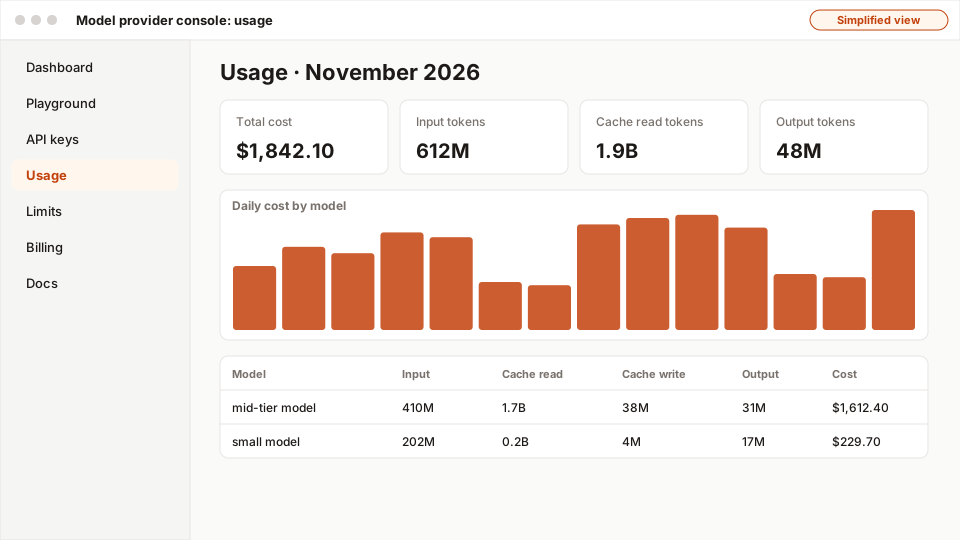
- 1Total cost for the period.
- 2Cache read tokens: prompt-cache hits, billed at a fraction of the input price.
- 3Daily cost: look for spikes after deploys or traffic changes.
- 4Per-model breakdown, including cache writes and reads.
Both consoles have a usage or cost page. Use it like this:
- Filter by API key or project so you see one app at a time.
- Split by model: is an expensive model doing work a cheap one could do?
- Compare input vs output tokens: input-heavy bills point to caching and shorter prompts; output-heavy bills point to
max_tokens, shorter formats or lower reasoning effort. - Look for cached input tokens: if they're near zero for a chatbot with a long system prompt, caching isn't working.
- Set budget alerts and hard limits before launch.
A real example
Example
A legal Q&A tool cuts its bill by two-thirds
A legal research tool sends a 40-page contract (about 25,000 tokens) with every question a lawyer asks about it, often 20 questions per contract within a few minutes. Without caching, each question re-bills all 25,000 tokens.
They moved the contract to the start of the prompt, right after a fixed system prompt, and enabled caching. Questions two to twenty now read the contract from cache at about a tenth of the price, and answers start noticeably faster. The bill for contract Q&A dropped by roughly two-thirds. Their one bug: an early version put the current date and time ("Today is 14 Nov, 09:31") at the top of the system prompt, which made every prefix unique. Moving it to the end fixed the cache hit rate.
The easy way
Start here
Before launch, multiply: requests per day × (input tokens × input price + output tokens × output price) ÷ 1,000,000. Then put your long, fixed instructions at the very top of every request and turn on caching. Check cached tokens in the usage data after a day.
When you grow: the production setup
Teams build a cost model per feature, log tokens and cost per request with the user/tenant ID, use caching for every stable prefix, batch offline jobs, route easy requests to cheaper models, cap max_tokens, alert on anomalies, and report cost per successful task alongside quality (cost optimization, cost per request).
Trade-offs
What you gain
- Per-token pricing means you pay only for what you use, starting at almost nothing.
- Caching gives large savings and faster responses for repeated prefixes, with little code.
- Batch APIs halve the cost of offline work.
What it costs you
- Costs scale with traffic and prompt length and are easy to underestimate.
- Caching only works for exact, recent prefixes and needs prompt discipline.
- Pricing structures differ by provider, making comparisons and forecasts tricky.
When not to use it
- Caching won't help when every request is unique from the first token, or traffic is so sparse that caches expire between requests.
- Batch APIs are wrong for anything a user is waiting for.
Common mistakes
- Estimating cost from input only and forgetting output (and reasoning) tokens.
- Putting a timestamp, user ID or random ID at the start of the prompt, which kills caching.
- Reordering tool definitions or JSON keys between requests (still not an identical prefix).
- Never checking cached-token counts to confirm caching works.
- Using the most expensive model everywhere without measuring whether a cheaper one passes.
Interview questions
Try answering out loud first, then open the model answer.
How would you estimate the monthly LLM cost of a new feature?
Model answer
Estimate requests per month from traffic, then measure (not guess) input and output tokens per request on realistic samples with the real tokenizer, including system prompt, history, retrieved context, tools and reasoning tokens. Multiply by each model's per-million prices, apply expected cache hit rates and batch discounts, add retries and evals, and include headroom for growth. Then validate with a pilot and usage dashboards.
What is prompt caching and how do you maximise cache hits?
Model answer
The provider stores the processed state of a prompt prefix and reuses it for later requests that start with exactly the same tokens, billing those at a large discount and reducing time to first token. Maximise hits by putting stable content (system prompt, tool schemas, long documents) first in a deterministic order, keeping volatile content (timestamps, user input) at the end, keeping traffic warm within the cache lifetime, and verifying with cached-token metrics.
Your LLM bill doubled this month. How do you investigate?
Model answer
Break down usage by feature, model, tenant and day; compare input vs output vs cached tokens; look for traffic growth, longer prompts (history or retrieval growing), a prompt change that broke caching, more retries or agent loops, a switch to a pricier model or higher reasoning effort, or abuse. Fix the root cause, then add per-feature budgets, alerts and dashboards.
Quiz
Pick an answer to see whether it’s right and why.
0 of 6 answered
Key terms
- Token pricing
- Charging for model use per million input tokens and per million output tokens, with output usually costing more.
- Input tokens
- All tokens you send in a request (system prompt, history, documents, tools), billed at the input price.
- Output tokens
- Tokens the model generates, including hidden reasoning tokens, billed at the (higher) output price.
- Prompt caching
- A provider feature that reuses the processed beginning of a prompt when it repeats exactly, making those tokens much cheaper and faster.
- Cache hit
- A request that finds what it needs already stored in a cache, so the expensive work is skipped.
- Batch API
- A way to submit many requests at once for processing within hours, at a large discount (often about 50%).
Before and after
Progress is saved in this browser only.