Area 07 // DeploymentLesson 124 / 14025 min read
Capstone: ship the RAG app
The deployment capstone takes the course's RAG app from a folder of Python to a shipped service, a Docker image, a GitHub Actions pipeline with tests and an eval gate, a staging deploy that waits for a health check, and an automatic rollback that is tested on every run, all with real runs from the course repository.
Think of it like this
Analogy
Opening a restaurant isn't the same as cooking a great dish at home. You need a kitchen that works the same every night (the image), a head chef who tastes everything before it leaves (tests and the eval gate), a soft opening for friends (staging), and a plan for when a new dish goes wrong: take it off the menu at once and keep serving the old one (rollback). This capstone builds all of that around the RAG app.
The problem it solves
In the RAG capstone you built a working app with tests and an eval script, but it only runs on your laptop. To ship it you need everything from this area working together: a container image (Docker), automation that tests, evaluates and builds every change (GitHub Actions), a deploy that only sends traffic to a healthy version (health checks), and a rollback you've actually tested. This lesson wires them up, with the real runs.
How it works, step by step
- Add health endpoints to the app:
GET /health(process alive) andGET /ready(index loaded and the chosen LLM provider configured; 503 if not). A test checks that/readyfails without a key. - Containerise it with the Dockerfile (slim base, dependencies before code, non-root user,
HEALTHCHECK,APP_VERSIONbuild argument) and a.dockerignore. - Describe the local stack in
compose.yaml(Compose): the app with a health check on/ready, and an optional Ollama service behind a profile. - Write the pipeline
.github/workflows/rag-app.ymlwith four chained jobs:test:pytest -q(mock LLM, no keys).eval-gate:python -m evals.run_evalwith thresholds on recall@3, MRR and citation validity (eval gates).build: build the image tagged with the commit SHA, smoke-test it withdocker compose up --waitplus real/readyand/askcalls, push it to GitHub Container Registry.deploy-staging: pull that exact image and rundeploy/deploy.sh.
- Deploy with a health gate (
deploy/deploy.sh): start the new image on a spare port, poll/readyfor up to 15 seconds, then replace the live container; if it never becomes ready, delete it and leave the live one untouched. - Test the rollback on every run: a "rollback drill" step deploys the same image with a deliberately missing secret and fails the pipeline if that broken release is promoted.
- Read the results in the Actions tab; make the checks required for merging.
- Go further (optional): the same image runs on Kubernetes with the manifests in
k8s/(readiness probes, rolling updates,kubectl rollout undo), or on a managed platform with/readyas its health check.
See it in code
- Needs
- The course repository: examples/rag-app/deploy/deploy.sh and .github/workflows/rag-app.yml. Docker on the machine that runs it.
The deploy script with its health gate (trimmed slightly), then the real output of the staging job.
#!/usr/bin/env bash
# Start NEW_IMAGE next to the running version, wait for /ready, then switch over.
# If it never becomes ready, remove it: the old version keeps serving.
set -euo pipefail
NEW_IMAGE="$1"; shift

echo "==> starting candidate $NEW_IMAGE on port 8001"
docker run -d --name rag-candidate -p 8001:8000 "$@" "$NEW_IMAGE" > /dev/null

for i in $(seq 1 15); do
  if curl -fs http://localhost:8001/ready > /dev/null; then
    echo "==> candidate ready after ${i}s: $(curl -s http://localhost:8001/ready)"
    docker rm -f rag-live > /dev/null 2>&1 || true
    docker rm -f rag-candidate > /dev/null
    docker run -d --name rag-live -p 8000:8000 "$@" "$NEW_IMAGE" > /dev/null
    echo "==> promoted: live is now $NEW_IMAGE"
    exit 0
  fi
  sleep 1
done

echo "==> candidate NOT ready after 15s: $(curl -s http://localhost:8001/ready || true)"
docker rm -f rag-candidate > /dev/null
echo "==> ROLLED BACK: live version unchanged: $(curl -s http://localhost:8000/health || echo 'none running')"
exit 1# Deploy with health check
==> starting candidate ghcr.io/<owner>/all-about-ai/rag-app:31fab5b on port 8001
==> candidate ready after 3s: {"ready":true,"checks":{"index_loaded":true,"provider_configured":true},"version":"31fab5b"}
==> promoted: live is now ghcr.io/<owner>/all-about-ai/rag-app:31fab5b
# Rollback drill (same image, started with LLM_PROVIDER=anthropic and no key)
==> starting candidate ghcr.io/<owner>/all-about-ai/rag-app:31fab5b on port 8001
==> candidate NOT ready after 15s: {"ready":false,"checks":{"index_loaded":true,"provider_configured":false},"version":"31fab5b"}
==> ROLLED BACK: live version unchanged: {"status":"ok","chunks":12,"version":"31fab5b"}
drill passed: live version still serving -> {"status":"ok","chunks":12,"version":"31fab5b"}Real output from run #2 of the course repository's pipeline (14 November 2026). The readiness response explains why the broken release was rejected (provider_configured: false), which is exactly what you want to see in a deploy log. The swap itself has a moment with no live container; production setups put a load balancer or Kubernetes Service in front so the switch is seamless.
On the real platform
What this looks like in GitHub Actions · See the real screen in the official docs
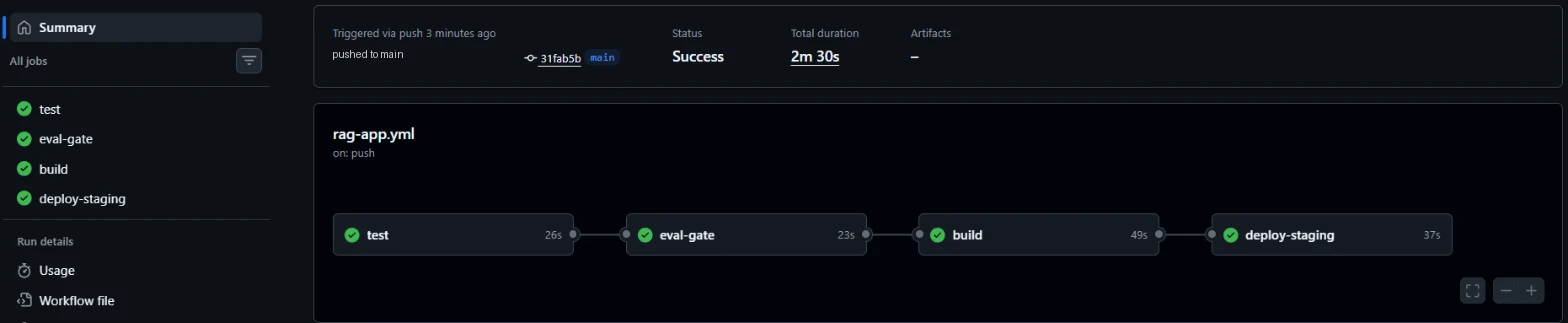
- 1The four jobs: test 26 s, eval-gate 23 s, build 49 s, deploy-staging 37 s.
- 2Success after 2 minutes 30 seconds, triggered by a push.
- 3deploy-staging includes the health-gated deploy and the rollback drill shown above.
Run #1, a minute earlier, is the other half of the story: test failed on a clean runner (ModuleNotFoundError: No module named 'rag_app', because plain pytest didn't put the app folder on the import path) and the three later jobs were skipped, so nothing was built or deployed. The fix was a two-line pyproject.toml; see the GitHub Actions lesson.
A real example
Example
What the smoke test proved
Between building and pushing, the build job started the stack with docker compose up -d --wait, which only returned after the container reported healthy, then asked the real question "How many days of annual leave do I get?". The running container answered "Full-time employees get 25 days of annual leave per year, plus public holidays. [1]" with citations_valid: true. So before the image ever reached the registry, the pipeline had proven that it starts, passes its health check and gives a correct, cited answer. A separate demo workflow ran the same image on a Kubernetes (kind) cluster and showed the same protection there: a release that couldn't become ready stalled at 0/1 while the old pods kept serving, and kubectl rollout undo restored it (Kubernetes basics).
The easy way
Start here
Use the repository's files as they are: copy Dockerfile, compose.yaml, deploy/deploy.sh and .github/workflows/rag-app.yml into your project, adjust paths and the eval command, push, and watch the Actions tab. For a real host, swap the deploy job for your platform's deploy command and point its health check at /ready.
When you grow: the production setup
Real deployments add a production environment with required approval, canary or blue-green releases with automated metric checks (release strategies), image signing and vulnerability scans, OIDC credentials to the cloud, infrastructure as code for the hosting resources (IaC), alerts and dashboards on SLOs, cost and quality (alerts), and prompt and model versions recorded with each release (versioning).
Trade-offs
What you gain
- Every change is tested, evaluated, built once and deployed the same way.
- Broken releases are rejected automatically, and the rollback is tested every run.
- Everything is code: reviewed, versioned and repeatable.
What it costs you
- More moving parts than copying files to a server.
- The single-host deploy script has a brief gap during the swap.
- CI minutes and registry storage aren't free on private repositories.
When not to use it
- A throwaway demo: a managed platform's "deploy from repo" button is enough. Add the pipeline when real users depend on it.
Common mistakes
- A
/healththat always says ok, so broken releases look healthy. - Deploying
latestinstead of the SHA-tagged image that passed the pipeline. - Never testing the rollback path until the day you need it.
- Running the eval gate after deploying instead of before building.
- Secrets in the workflow file or the image.
Interview questions
Try answering out loud first, then open the model answer.
Walk through how you'd ship a RAG service safely.
Model answer
Add liveness and readiness endpoints; containerise with a pinned base image and run-time config; build a pipeline that runs unit tests with a mock model, an eval gate on a golden set, builds an image tagged with the commit SHA, smoke-tests it (start it, call /ready and a real question), pushes it, then deploys to staging with a readiness gate and automatic rollback; promote the same image to production gradually with monitoring of errors, latency, cost and quality; and practise rollbacks.
What should a readiness check for an LLM app verify?
Model answer
That the instance can serve real requests: indexes or models loaded, required configuration and secrets present, essential internal dependencies reachable; it should return details of failed checks. It shouldn't call the paid model on every probe; deeper checks (a real question) belong in smoke tests and synthetic monitoring.
How do you know your rollback works?
Model answer
Test it continuously: a pipeline step or scheduled drill deploys a deliberately broken release (for example missing a secret) and asserts that it isn't promoted and the previous version keeps serving; in Kubernetes, verify that failed rollouts stall and that rollout undo restores service; and review rollback time after incidents.
Quiz
Pick an answer to see whether it’s right and why.
0 of 5 answered
Key terms
- CI/CD
- Continuous integration and continuous delivery. Automatically building, testing and deploying every change through a pipeline.
- Eval gate
- A pipeline step that runs evals on a change and blocks the merge or release if quality falls below thresholds or regresses versus main.
- Health check
- A small endpoint (like /health or /ready) that the platform calls to decide whether an instance is alive and should get traffic.
- Rollback
- Returning to the previous known-good version of code, config, prompt or model after a bad release.
- Container registry
- A server that stores and serves container images by name and tag, such as GitHub Container Registry, Docker Hub or a cloud registry.
Before and after
Progress is saved in this browser only.