Area 07 // DeploymentLesson 112 / 14015 min read
GitHub Actions
GitHub Actions runs automated workflows (tests, eval gates, image builds, deployments) on GitHub's machines whenever something happens in your repository, such as a push or pull request, using YAML files in .github/workflows that describe jobs made of steps.
Think of it like this
Analogy
A kitchen with a recipe card for every event: "when an order comes in (trigger), the prep station washes and chops (job 1); only when that's done does the grill cook (job 2), then plating (job 3)". Each station starts with a clean bench (a fresh runner), follows the card step by step, and if one station spoils the food, the later stations don't bother. The cards are kept in a drawer everyone can read and improve: .github/workflows.
The problem it solves
You know what a CI/CD pipeline should do: test, run the eval gate, build, deploy, roll back. Now you need something to actually run it on every push, on clean machines, with secrets handled safely, results shown on every pull request, and failures blocking merges. If your code is on GitHub, GitHub Actions is the built-in way to do that.
How it works, step by step
- Create a workflow file in
.github/workflows/(e.g.rag-app.yml). It's YAML, reviewed in pull requests like any code. - Triggers (
on):push,pull_request,workflow_dispatch(a "Run workflow" button),schedule(cron), and more.paths:filters limit runs to changes that matter. - Jobs run in parallel by default on runners: fresh virtual machines (
runs-on: ubuntu-latest) with Docker, Python, Node and common tools preinstalled. - Steps inside a job run in order:
uses:a published action (actions/checkout,actions/setup-python) orrun:shell commands. needs:chains jobs into a pipeline: test → eval gate → build → deploy. If a job fails, jobs that need it are skipped.- Secrets and permissions: secrets are set in the repository or environment settings and read as
${{ secrets.NAME }}(masked in logs); the built-inGITHUB_TOKENgets only thepermissions:you grant (here,packages: writeto push the image to GitHub Container Registry) (secrets). - Environments (
environment: staging) add their own secrets, protection rules and required approvals, for example before production. - Speed: caching (
cache: pip), running independent jobs in parallel, andpaths:filters. - Results: every run shows its jobs, steps and logs in the Actions tab and a ✓ or ✗ on the commit and pull request; make the checks required in branch protection (Git and GitHub).
See it in code
- Needs
- A GitHub repository. The full file is .github/workflows/rag-app.yml in the course repository; this is the shape of it.
The capstone's pipeline: four jobs chained with needs, run on every push that touches the app.
name: rag-app
on:
  push:
    branches: [main]
    paths: ["examples/rag-app/**", ".github/workflows/rag-app.yml"]
  pull_request:
    paths: ["examples/rag-app/**"]
  workflow_dispatch:                       # adds a "Run workflow" button
permissions: { contents: read, packages: write }
defaults: { run: { working-directory: examples/rag-app } }

jobs:
  test:
    runs-on: ubuntu-latest
    steps:
      - uses: actions/checkout@v5
      - uses: actions/setup-python@v6
        with: { python-version: "3.12", cache: pip }
      - run: pip install -r requirements-dev.txt
      - run: pytest -q
  eval-gate:
    needs: test                            # only runs if test passed
    steps: [checkout, setup-python, "pip install", "python -m evals.run_eval"]
  build:
    needs: eval-gate
    steps: ["docker build", "docker compose up --wait + smoke test", "docker push ghcr.io/..."]
  deploy-staging:
    needs: build
    environment: staging
steps: ["bash deploy/deploy.sh (health check)", "rollback drill"]rag-app #1 (Run workflow button) ✗ failed in 27s
test ✗ 23s E ModuleNotFoundError: No module named 'rag_app'
eval-gate – skipped
build – skipped
deploy-staging – skipped
rag-app #2 (push of the fix) ✓ Success in 2m 30s
test ✓ 26s
eval-gate ✓ 23s
build ✓ 49s
deploy-staging ✓ 37sThese are the course repository's real first two runs (14 November 2026). Run #1 failed because plain pytest couldn't import the app package (locally it had always been run as python -m pytest, which adds the folder to the import path); the three later jobs were skipped automatically. A two-line pyproject.toml fix went out as run #2, and everything went green.
On the real platform
What this looks like in GitHub Actions · See the real screen in the official docs
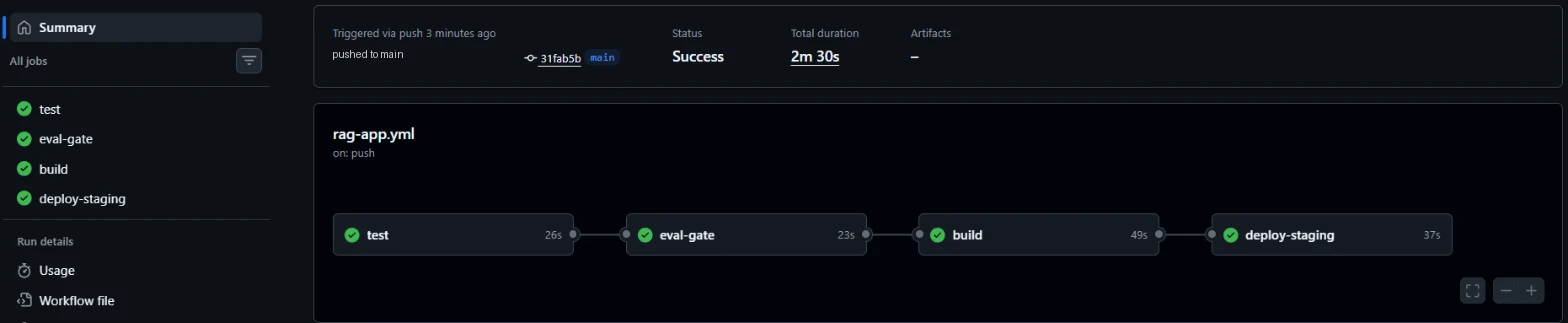
- 1Every job, with a green tick or red cross; click one to read its logs step by step.
- 2The overall status and total duration of the run.
- 3The job graph: needs turns jobs into a chain, so a failure stops everything to its right.
- 4deploy-staging only ran because all three earlier jobs passed.
Other places to know: Actions → (workflow) → Run workflow for manual runs, Settings → Secrets and variables → Actions for secrets, Settings → Environments for staging and production rules, and Settings → Branches to make these checks required before merging.
A real example
Example
The pipeline that caught its own bug
The run above is the example. The test suite passed on the author's laptop, so it felt safe to push. The first run on a clean GitHub runner exposed an environment difference (how pytest finds the package), failed in 27 seconds, and skipped the build and deploy jobs, so no image was pushed and staging was untouched. The fix, a small config file, triggered the workflow automatically through its paths: filter, and the second run deployed to staging and passed its rollback drill. Clean runners exist precisely to catch "works on my machine" problems.
The easy way
Start here
Copy a starter workflow from the Actions tab (Python application), make it run your tests on push and pull_request, then add jobs one at a time: eval gate, Docker build, deploy. Mark the test job as a required check in branch protection.
When you grow: the production setup
Mature setups use reusable workflows and composite actions shared across repos, actions pinned to commit SHAs, least-privilege permissions: per job, OpenID Connect to cloud providers instead of long-lived keys, environments with required reviewers for production, caching and matrix builds, concurrency groups to cancel outdated runs, self-hosted or larger runners for GPU or heavy jobs, and alerts on failed main-branch runs.
Trade-offs
What you gain
- Built into GitHub: no separate CI server to run.
- Clean machines catch environment-specific bugs.
- Huge library of reusable actions.
What it costs you
- YAML gets complex; debugging means reading logs of remote machines.
- Free minutes are limited on private repositories.
- Third-party actions are a supply-chain risk if not pinned and reviewed.
When not to use it
- Code that isn't on GitHub: use your platform's CI (GitLab CI, Bitbucket Pipelines, or a standalone CI service).
Common mistakes
- API keys written into the YAML instead of secrets.
- Granting broad
permissions:(or none specified) to every job. - No
needs:, so deploys run even when tests fail. - Running tests locally a different way from CI (the bug in run #1).
- Unpinned third-party actions.
Interview questions
Try answering out loud first, then open the model answer.
Explain the structure of a GitHub Actions workflow.
Model answer
A YAML file in .github/workflows with triggers under on (push, pull_request, workflow_dispatch, schedule), optional permissions, env and defaults, and jobs. Each job has runs-on (the runner), optional needs (dependencies), environment, and steps that either use actions or run shell commands. Jobs run in parallel unless chained with needs; results appear as checks on commits and pull requests.
How do you handle secrets in GitHub Actions?
Model answer
Store them as encrypted repository, organisation or environment secrets and reference them as secrets.NAME; GitHub masks them in logs. Prefer OIDC federation to cloud providers instead of long-lived keys, scope GITHUB_TOKEN with minimal permissions, use environment protection for production secrets, and never echo secrets or pass them to untrusted actions or pull requests from forks.
How would you set up CI/CD for an LLM app with GitHub Actions?
Model answer
A workflow triggered on pull requests and pushes to main: a test job with mocked models, an eval-gate job that needs it, a build job that builds, smoke-tests and pushes an image tagged with the SHA, and a deploy job using a protected environment that deploys with health checks and automatic rollback; required checks on the branch; secrets in environments; caching for speed.
Quiz
Pick an answer to see whether it’s right and why.
0 of 5 answered
Key terms
- GitHub Actions
- GitHub's built-in automation that runs workflows (tests, builds, deployments) on fresh machines when something happens in a repository, such as a push or pull request.
- Workflow (LLM)
- A fixed sequence of steps controlled by code, where LLM calls fill in specific blanks such as classifying or drafting.
- Job (CI)
- A group of steps in a CI workflow that runs on one machine. Jobs run in parallel unless one needs another to finish first.
- Runner
- The machine that executes a CI job. GitHub provides fresh virtual machines (like ubuntu-latest) for each job, or you can host your own.
- CI/CD
- Continuous integration and continuous delivery. Automatically building, testing and deploying every change through a pipeline.
- Secret
- Any credential that grants access, such as an API key, password, token or private key. It must never appear in code, prompts, logs or images.
Before and after
Progress is saved in this browser only.