Area 03 // AI AgentsLesson 53 / 14016 min read
MCP: servers and clients
The Model Context Protocol (MCP) is an open standard for connecting AI apps to tools and data, so a tool written once as an MCP server can be used by any MCP client (Claude, ChatGPT, IDEs, your own agents) instead of building a custom integration for every app.
Think of it like this
Analogy
Before USB, every printer, mouse and camera had its own special cable and driver. USB made one standard plug, so any device works with any computer.
MCP is that standard plug for AI: a company writes its "order lookup" tool once as an MCP server, and it works in Claude, in ChatGPT, in coding IDEs and in your own agents, all of which are MCP clients.
The problem it solves
Without a standard, every AI app integrates every tool separately: the Slack integration for app A, a different one for app B, another for your in-house agent. With 5 apps and 20 tools that's 100 integrations, each with its own bugs and auth. Tool builders can't reach every app, and app builders can't support every tool.
How it works: MCP servers
- An MCP server is a small program that exposes capabilities through the protocol (JSON-RPC 2.0 messages). As of November 2026 the current spec version is 2026-07-28.
- It can offer three things:
- Tools: functions the model can call (
get_order_status(order_id)), with names, descriptions and JSON Schemas, exactly like tool calling. - Resources: data the app or model can read (
policy://returns, files, database records). - Prompts: reusable prompt templates users can pick ("summarise this PR").
- Tools: functions the model can call (
- Transports: stdio (the client starts the server as a local process; common for desktop tools such as file access or git) or Streamable HTTP (a remote server; uses OAuth-based authorization).
- Build one with an SDK: in Python's
mcppackage (version 2.x as of November 2026), create anMCPServer, decorate functions with@server.tool()and@server.resource(...), and run it. (In 1.x this class was calledFastMCP.) - Extensions add optional features: as of the 2026-07-28 spec, long-running Tasks, Skills over MCP and interactive MCP Apps.
How it works: MCP clients
- The host is the AI application (Claude Desktop, an IDE, ChatGPT, your own agent). It contains one MCP client per connected server.
- Connect: the client launches (stdio) or connects to (HTTP) the server and negotiates capabilities.
- Discover: the client lists the server's tools, resources and prompts.
- Expose to the model: the host adds the tools to the model's tool list.
- Call: when the model requests a tool, the client sends
call_toolto the server and returns the result to the model. - Elicitation: a server can ask the client to get extra input from the user mid-task (e.g. "which account?").
- Consent and control: the spec asks hosts to get user consent before exposing data or invoking tools; good hosts show which servers are connected and ask before risky actions (MCP server trust).
- User to Host app + model
- Host app + model to Files server: client 1
- Host app + model to Orders server: client 2
- Host app + model to Wiki server: client 3
See it in code
- Install
pip install mcp- Needs
- Python 3.10+. mcp 2.x as of November 2026; runs offline (the client talks to the server in memory).
A complete MCP server with a tool and a resource, and a client that discovers and calls them.
import asyncio
from mcp import Client
from mcp.server import MCPServer

# ---- An MCP SERVER: exposes tools and resources to any MCP client ----
server = MCPServer("Orders")

@server.tool()
def get_order_status(order_id: str) -> str:
    """Look up the delivery status of an order by its ID."""   # the description the model sees
    return {"A1234": "out for delivery"}.get(order_id, "order not found")

@server.resource("policy://returns")
def returns_policy() -> str:
    """The returns policy text."""
    return "Items can be returned within 30 days."

# ---- An MCP CLIENT: discovers and calls what the server offers ----
async def main():
    async with Client(server) as client:           # in-memory here; a URL or stdio command in real use
        tools = await client.list_tools()
        print("tools    :", [(t.name, t.description) for t in tools.tools])
        result = await client.call_tool("get_order_status", {"order_id": "A1234"})
        print("call     :", result.content[0].text)
        res = await client.read_resource("policy://returns")
        print("resource :", res.contents[0].text)

asyncio.run(main())tools : [('get_order_status', 'Look up the delivery status of an order by its ID.')]
call : out for delivery
resource : Items can be returned within 30 days.To use it from other apps, serve it over HTTP (uv run mcp run orders_mcp.py --transport streamable-http) or register it as a stdio command in your host's MCP settings. uv run mcp dev orders_mcp.py opens the MCP Inspector, a browser UI for testing a server's tools by hand.
On the real platform
What this looks like in the MCP Inspector and MCP host settings · See the real screen in the official docs
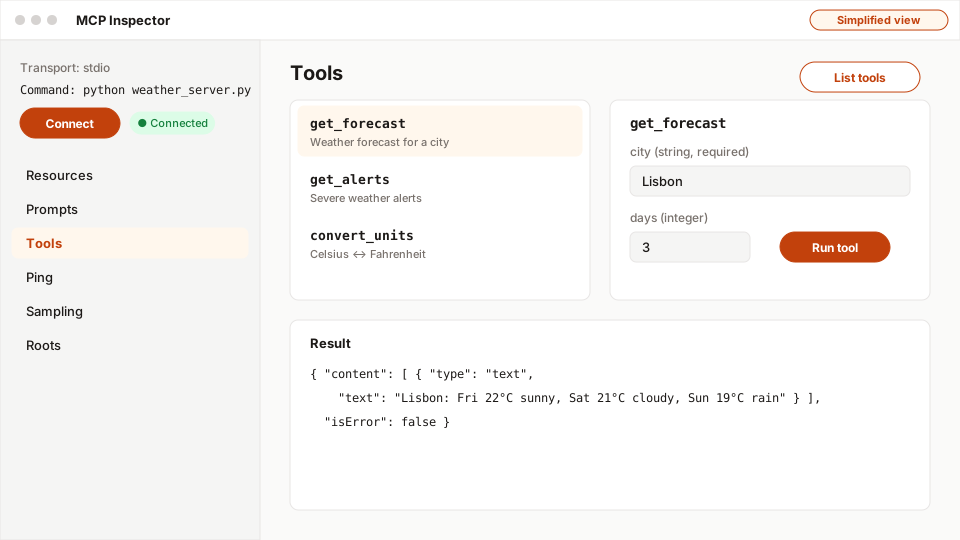
- 1Choose the transport and command, then connect to your server.
- 2List tools: names and descriptions exactly as the model will see them.
- 3A form generated from the tool's input schema.
- 4Run the tool without any model involved.
- 5The raw result, including isError.
- MCP Inspector (
uv run mcp dev server.pyornpx @modelcontextprotocol/inspector): a local web page where you connect to a server, see its Tools / Resources / Prompts tabs, call a tool with arguments and see the raw result. Use it before connecting any real host. - Host settings: desktop and IDE hosts have an MCP or "connectors" settings page where you add a server (a command for stdio, or a URL for HTTP), see its tools, and turn individual tools on or off.
- Approvals: good hosts ask before calling a tool the first time; keep that on for anything that writes data.
A real example
Example
One orders server, four AI apps
A retailer had separate "check order" integrations in its support chatbot, its internal Slack bot and two staff tools. Each broke differently when the orders API changed.
They wrote one read-only MCP server over the orders API (with OAuth so it acts as the signed-in staff member) and connected it to all four apps, plus staff members' desktop AI assistants. When the orders API changed, they fixed one server. Later they added a second server for refunds, with every refund tool call requiring human approval in the host.
The easy way
Start here
Write a 15-line MCP server like the one above around one read-only function you already have. Test it in the MCP Inspector. Then add it to an MCP host you use (a desktop assistant or IDE) and ask a question that needs it.
When you grow: the production setup
Production MCP servers run over Streamable HTTP behind authentication (OAuth), enforce per-user authorization inside every tool, log calls for audit, rate-limit, version their tool schemas, avoid exposing secrets in results, and are reviewed like any API. Organisations keep an allow-list of approved servers and pin versions (MCP server trust).
Trade-offs
What you gain
- Build a tool once, use it in every MCP-compatible app.
- Standard discovery, schemas and transport; large ecosystem of ready-made servers.
- Clear separation: tool owners maintain servers, app builders consume them.
What it costs you
- Another moving part (server processes, auth, versions).
- Third-party servers are a supply-chain and prompt-injection risk.
- Each connected server adds tool definitions to the context, costing tokens.
When not to use it
- A single app with one or two internal tools: plain function tools in your code are simpler.
- You can't vet or control the server's code and permissions.
Common mistakes
- Connecting unknown third-party servers with broad permissions.
- Assuming the server's tool descriptions are trustworthy instructions.
- Exposing write tools without approval flows.
- Following old FastMCP-based tutorials with the 2.x SDK (the class is
MCPServernow). - Connecting dozens of servers, flooding the context with tool definitions.
Interview questions
Try answering out loud first, then open the model answer.
What is MCP and why does it matter?
Model answer
The Model Context Protocol is an open, JSON-RPC-based standard that lets AI applications (hosts with clients) connect to servers exposing tools, resources and prompts over stdio or Streamable HTTP. It replaces bespoke integrations per app and tool with one protocol, so tools are reusable across hosts and apps can use a broad ecosystem of servers, while standardising discovery, schemas, auth and consent.
How would you expose an internal API to AI assistants via MCP securely?
Model answer
Build an MCP server with narrow, well-described tools; serve it over Streamable HTTP with OAuth so calls carry the end user's identity; enforce authorization per tool and object; keep tools read-only initially and require host-side approval for writes; validate inputs, rate-limit, log every call, avoid returning secrets, version schemas, and register the server in an organisational allow-list.
MCP vs A2A: what's the difference?
Model answer
MCP connects an agent or AI app to tools and data (agent-to-capability). A2A connects agents to other independent agents as peers (agent-to-agent), with discovery via Agent Cards, task lifecycles and messaging. They're complementary: an agent might use MCP servers internally and talk to other agents through A2A.
Quiz
Pick an answer to see whether it’s right and why.
0 of 6 answered
Key terms
- MCP (Model Context Protocol)
- An open standard for connecting AI applications to tools, data and prompts through servers that any compatible client can use.
- MCP server
- A program that exposes tools, resources and prompts over the Model Context Protocol.
- MCP client
- The connector inside an AI app that talks to one MCP server, discovering and calling what it offers.
- MCP host
- The AI application (such as a desktop assistant, IDE or your own agent) that runs the model and manages MCP client connections.
- Tool calling (function calling)
- A model replying with a request to run one of your functions, with arguments; your app runs it and sends the result back.
Before and after
Progress is saved in this browser only.